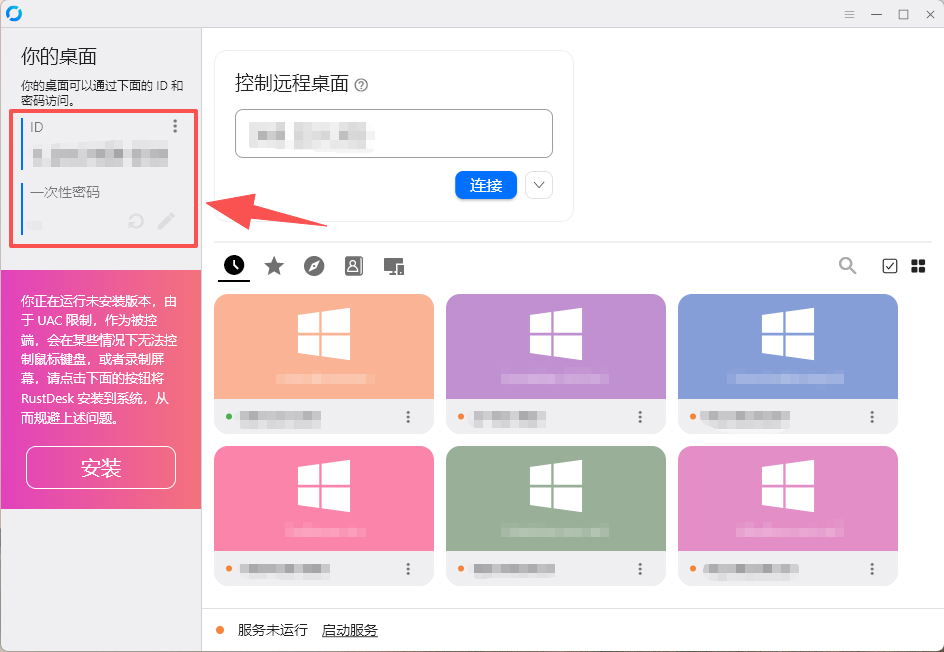
Download & run
Press the download button and pick your platform in the download section. The Windows build needs no installation — just double-click it.
Takes ~30 seconds
Download our secure remote tool and an engineer can connect instantly over an encrypted channel to resolve your issue — no install, no sign-up, and you stay in control.
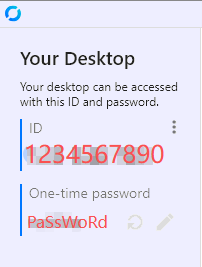
Share both values with your APRO support engineer.
You approve the session and can end it anytime.
Three steps
The whole process usually takes under three minutes, and you can stop the session at any moment.
Press the download button and pick your platform in the download section. The Windows build needs no installation — just double-click it.
Takes ~30 seconds
Send the “ID” and “One-time password” shown on screen to your APRO engineer.
No sign-up
Keep the app open. Your engineer connects over the encrypted channel and works only with your approval.
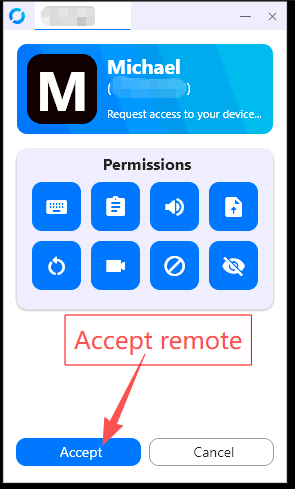
Stop anytime
Download
All three builds are the official RustDesk 1.5.0 release. Windows runs without installation; macOS and Android need a normal install. The connection steps are identical on every platform.
X64 (Intel / AMD)
Single portable file — double-click to run, no installation.
Direct download · 24.7 MB
ARM64 (Apple Silicon)
For Apple Silicon Macs (M1 – M4). Open the .dmg and drag it into Applications.
Direct download · 28.5 MB
Intel Mac? x86_64 .dmg · 35.2 MB
ARM64 devices
Signed APK — allow installs from this source when your phone asks.
Direct download · 27.4 MB
Official RustDesk 1.5.0 builds (open source, auditable). Files are served directly from this site; any build not uploaded yet links to the official GitHub release.
FAQ
Yes. RustDesk uses end-to-end encryption, and a session only starts after you accept it on your machine. You can end the session or close the app at any time.
On Windows, no: it is a single portable executable, just double-click it. macOS and Android builds do need a normal install. If your company machine restricts new software, please check with your IT administrator first.
Your engineer only sees the screen during the session you approved, and only works on the issue you reported. Please avoid typing banking or other sensitive passwords while connected.
Reopen the app and share the new ID and password. If it still fails, make sure your firewall or antivirus is not blocking the connection — your engineer will help you troubleshoot.
Download the tool, share your ID and password with your APRO engineer, and we will take it from there.
RustDesk 1.5.0 · Windows · macOS · Android